


- Featuring a vibrant deep Red design officially licensed controller for Xbox Series X/S and…

Finding a gaming controller at an affordable price can be difficult, but the GameSir G7 Pro controller is an option that offers the features found in premium controllers—taking the gaming experience to the next level. With the “Pro” designation, it stands out as a tech-friendly controller. Can the GameSir controller knock other controllers out of the competition?
GameSir G7 Pro:- Specifications
| Feature | Specification |
|---|---|
| Brand Name | GameSir |
| Model Name | G7 Pro |
| Compatible Devices | Xbox Series X|S, Xbox One, PC, Android |
| Connectivity | Wired (for Xbox/PC), 2.4G Wireless (for PC), and Bluetooth (for Android) |
| Polling Rate | Up to 1000Hz (standard) or up to 8000Hz (on select 8K PC variants) |
| Thumbsticks | GameSir Mag-Res™ TMR sticks (anti-stick drift, Hall Effect-style durability) |
| Triggers | Hall Effect analog triggers with Micro Switch physical trigger stops |
| D-Pad & Buttons | Mechanical micro-switch D-pad; Optical micro-switch ABXY buttons |
| Extra Buttons | 4 customizable macro buttons (R4/L4 back buttons and R5/L5 mini bumpers) |
| Vibration/ Haptics | 4 built-in rumble motors (one in each grip and trigger) |
| Gyroscope | 6-axis built-in gyro with mapping function (PC only) |
| Audio | 3.5mm Headphone Jack (supported via wired and 2.4G wireless) |
| Battery & Charging | 1200mAh battery; includes Smart Auto Start-Stop Charging Station |
| Customization | Swappable magnetic faceplates, programmable in GameSir Nexus/Connect software |
| Dimensions & Weight | 152 × 103 × 58 mm / 272g (approx.) |
| PRICE | $79.99 |
GameSir G7 Pro :- Design and Quality
The Xbox-style controller design offers a superior gaming experience; the GameSir G7 Pro stands out with its excellent ergonomics, size, and weight. It features an ‘Eggshell White’ color and texture on the front, which not only makes it easier to keep clean but also gives it a premium look.

The GameSir G7 Pro comes with transparent buttons, a silver D-pad, and light gray grips featuring a rubberized finish—which is particularly helpful for maintaining a firm hold if your fingers sweat during gaming sessions. Gamers also get transparent triggers, extra bumpers, and a docking station included in the package, along with a wireless dongle, USB-C cable, and cable retainer for connectivity.
The inclusion of RGB lighting would have made the controller even better, especially given the transparent triggers, buttons, and extra mini-bumpers. The design bears a striking resemblance to a panda, though a black version is also available on the market. Additionally, the controller features a removable faceplate, allowing you to clearly see the internal components when it is taken off.
If I were to point out any design flaws, the plastic feels cheap and makes a rattling, loud noise; however, the grips provide a solid hold that significantly improves the gaming experience. Using the GameSir controller feels great, offering the kind of sturdy and comfortable grip you would expect from an Xbox controller.
GameSir G7 Pro :- Gaming Performance
The GameSir G7 Pro features excellent trigger mechanics, and the rubberized finish on the buttons ensures a solid grip during intense combat. The triggers act like super-fast clickers, giving you a decisive edge over opponents during gameplay. The option to switch the analog triggers to short-throw microswitches is a highly useful feature that sets this controller apart from others—I particularly liked the ‘Night City’ edition of the G7 Pro. The triggers allowed for rapid braking, helping me win the game. The G7 Pro offers a fresh gaming experience; the combination of four rumble motors delivers both powerful and subtle vibrations that feel fantastic.
I conducted some tests to check the controller’s real-world gaming performance and found no issues with the G7 Pro; it easily delivers a 1,000Hz polling rate typical of desktop-grade performance. It offers convenient wireless connectivity for headsets, allowing gamers to easily use gaming headsets—like the Rig—during their sessions. Another major benefit is the 1,200mAh battery, which provides an impressive and reliable power source, easily delivering up to 10 hours of battery life.

When pressing the buttons deeply during gameplay, the response time slows down slightly. The GameSir G7 Pro controller’s microswitch buttons do not feel mushy or loose, though gamers might not get that instant, snappy feedback they expect. I feel that in games like *Hunt: Showdown* and other FPS titles, the response slows down a bit with prolonged presses; however, the controller handles fine inputs with ease, and the triggers can be switched between a snappy feel and a standard analog trigger mode.
If I were to offer a suggestion, the GameSir G7 Pro controller makes for an excellent Xbox gaming experience—though it does have a few shortcomings. Minor flaws are common in controllers of all types, but in my experience, the GameSir G7 Pro delivers the kind of premium gaming performance usually found in this price range.
GameSir G7 Pro :- Features That Stand Out
This controller features TMR (Tunneling Magneto resistance) joystick hardware—a key advantage for gamers using the GameSir controller. TMR thumbsticks offer enhanced durability and superior responsiveness; furthermore, the GameSir G7 Pro improves upon Hall Effect technology by eliminating the “stick drift” issue, ensuring highly precise control—especially when making minute adjustments. The use of TMR thumbsticks is particularly beneficial for playing shooter games. Additionally, the controller includes physical trigger stops that allow you to switch from analog Hall Effect triggers to micro-switch triggers, resulting in faster response times.
The controller features a dedicated slot to safely store the USB wireless dongle so it doesn’t get lost, as well as a magnetic connector for charging. Once fully charged, it offers hours of game play. Regarding connectivity, the controller supports Bluetooth and can be used with Xbox (Series X/S or One), PC, or Android devices.

The controller uses optical microswitches for the “ABXY” buttons, whereas mechanical microswitches are used for the D-pad. In my experience, the D-pad is the weakest part of this controller; it feels a bit soft or loose. Gamesir includes different caps—such as a smooth, round cap for the eight-way D-pad—but using it wasn’t a great experience;
it is quite sensitive and registers unintended directional inputs during game play. Regarding hardware, the controller features two mappable buttons (which can also be locked) and two mini-bumpers on the top. Like Xbox controllers, it includes a 3.5mm headphone jack at the bottom, a mute button for the microphone, and a pairing button for wireless connectivity.
GameSir G7 Pro :- Software & Customization
Gamers get access to the Nexus app—which can be fully utilized on a desktop—to customize the GameSir G7 Pro controller. While the Nexus app is available for Android, PC, and Xbox, the mobile version offers fewer options; gamers can download the app from the Microsoft Store. It offers complete freedom to customize your controller—a level of customization and choice not typically found in controllers from other companies at this price point.

To customize the GameSir G7 Pro controller using the Nexus app, you need to long-press a button on the controller until it vibrates, indicating a successful connection—though this process can sometimes take a little while time. However,
If you want to customize the controller without using an app, you can use the buttons directly on the device—it supports on-the-fly button mapping. However, this often involves a bit of guesswork, and you won’t have access to macro or turbo features. On a desktop, motion control can be used for mouse-look functionality and D-pad inputs, making the GameSir G7 Pro a superior choice for gaming.
You get button assignment options; for instance, you can map all buttons—except the ‘M’ button—to function like mouse or keyboard inputs. It also allows you to adjust the response settings for the triggers and joysticks. Additionally, the app features a customization save mode and lets you customize the four vibration motors.
I really liked the GameSir G7 Pro controller because it offers gamers the option to customize it to their liking—though there are a few shortcomings as well. The Nexus app features a standard UI, but it gives users complete freedom to operate it according to their preferences, making this controller an excellent choice for gamers.
Is GameSir G7 Pro Worth It?
This is truly one of the best controllers available for Xbox gamers in this price range. At first glance, it impresses with its colors and premium, stylish design. You can also customize it to suit your preferences. There are a few downsides, however—such as the lack of RGB lighting and an onboard display. It comes at a great price and features a 1200mAh battery that lasts for about 12 hours on a full charge. True to the “Pro” in its name, this Xbox controller delivers performance that exceeds expectations; I would certainly recommend purchasing it.
GameSir G7 Pro:- Pros and Cons
| Pros | Cons |
|---|---|
| controller design You Can Feel | Still only two back buttons |
| Best Four extra buttons | Room for More Design Flexibility |
| TMR thumbsticks | RGB Enthusiasts May Feel Left Out |
| Rubberized Grips for All-Day Gaming Comfort | |
| Good accessories included |

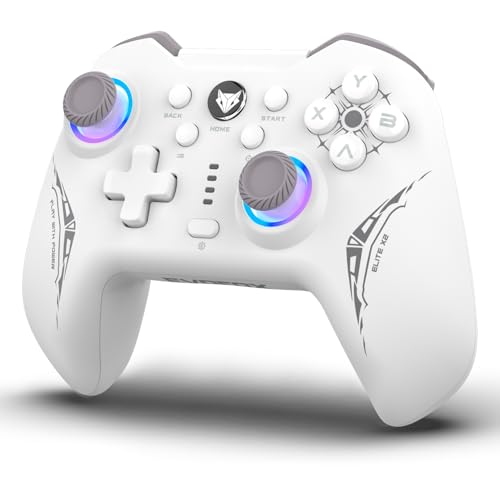
- 𝗡𝗲𝘅𝘁-𝗚𝗲𝗻 𝗣𝗖 𝗚𝗮𝗺𝗲𝗽𝗮𝗱 𝘄𝗶𝘁𝗵 𝗛𝗮𝗹𝗹𝗦𝗲𝗻𝘀𝗲 𝗛𝗮𝗹𝗹 𝗘𝗳𝗳𝗲𝗰𝘁 𝗧𝗲𝗰𝗵𝗻𝗼𝗹𝗼𝗴𝘆 : Built with magnetic Hall Effect sensors, this game controlle…

- Ultra-low latency wired connection:Experience near-instantaneous response times with the Tegenaria Lite’s ultra-low late…
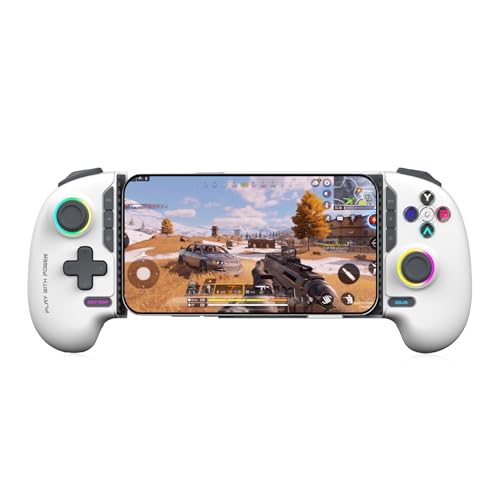
- 𝗛𝗮𝗹𝗹 𝗘𝗳𝗳𝗲𝗰𝘁 𝗧𝗿𝗶𝗴𝗴𝗲𝗿𝘀 𝗮𝗻𝗱 𝗝𝗼𝘆𝘀𝘁𝗶𝗰𝗸𝘀 𝘄𝗶𝘁𝗵 𝗭𝗲𝗿𝗼 𝗗𝗿𝗶𝗳𝘁 : Magnetic sensing technology in this gaming controller delivers ultr…
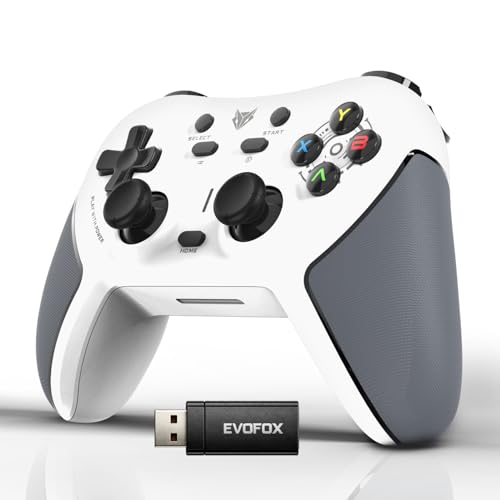
- 𝗛𝘆𝗽𝗲𝗿-𝗖𝗼𝗻𝗻𝗲𝗰𝘁 𝗗𝗼𝗻𝗴𝗹𝗲 𝗳𝗼𝗿 𝗨𝗹𝘁𝗿𝗮-𝗦𝘁𝗮𝗯𝗹𝗲 𝗚𝗮𝗺𝗲𝗽𝗹𝗮𝘆 : Engineered for low-latency, interference-free connectivity, the Hyper-C…

Hi, I’m Arpit Soni, a seasoned professional blogger with 5+ years of experience in the digital content industry. I have successfully written 200+ high-quality product review articles, covering the tech product .
I am the Founder, Lead Writer and Content Creator at TechCircleHub, where I deliver well-researched, trustworthy, and user-focused tech content. I also consistently provide valuable insights and information through various social media platform.


